01 / 04
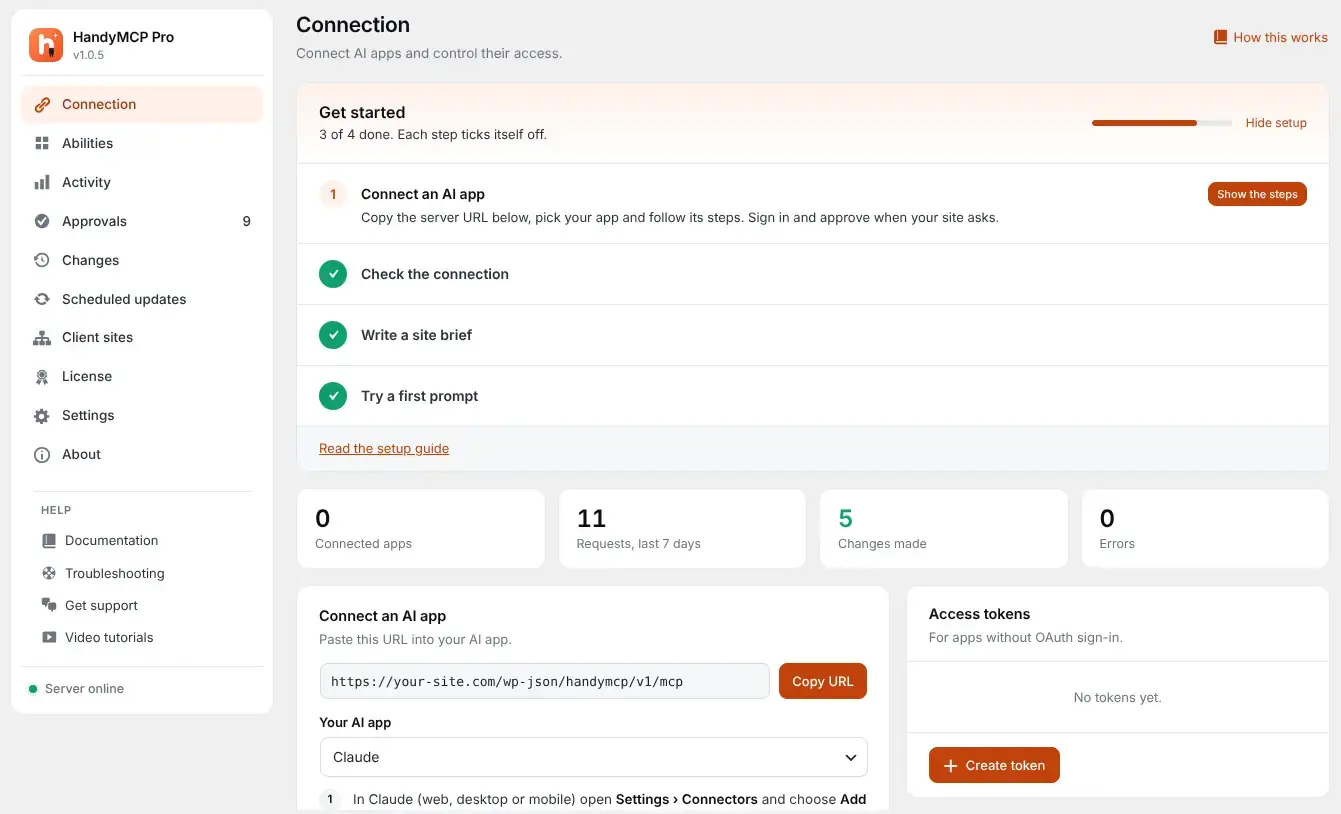
One URL for every AI app
Copy the server URL, follow the steps for your app and watch connected apps, tokens and sessions in one place.
- OAuth sign-in for Claude and ChatGPT
- Access tokens for other apps
- Pause or disconnect any app


NewApproval mode: check AI changes before they go live
HandyMCP is the free WordPress MCP server plugin for Claude, ChatGPT, Cursor and any AI agent. Edit pages, Elementor and WooCommerce in plain words. Every change is logged, and site edits undo in one click.
Build a spring sale landing page with Elementor and add it to the main menu.
Done. The draft "Spring sale" is ready for review. You can undo the whole task in one click.
Product tour
Connect your AI app, build a page, approve a change and undo it. Every screen is the real plugin.
Works with the AI app you already use
Step-by-step setup for more than 20 AI apps, plus any other app that supports remote MCP servers.
01Get started
No code and no server setup. If your AI app can add a connector, it can work with your WordPress site.
Add HandyMCP to your site like any other plugin. It works on WordPress 6.2 and newer, with PHP 7.4 or higher.
Ready in a minute
Copy the server URL into Claude, ChatGPT, Cursor or any MCP app. Sign in, pick what it may do and approve.
Secure OAuth sign-in
Ask for a new landing page, a price change or a plugin update. HandyMCP does the work and logs every change.
Done, logged, reversible
02Features
Start free with page building and content. Pro adds WooCommerce, every major builder, safe updates, backups, security and client sites.
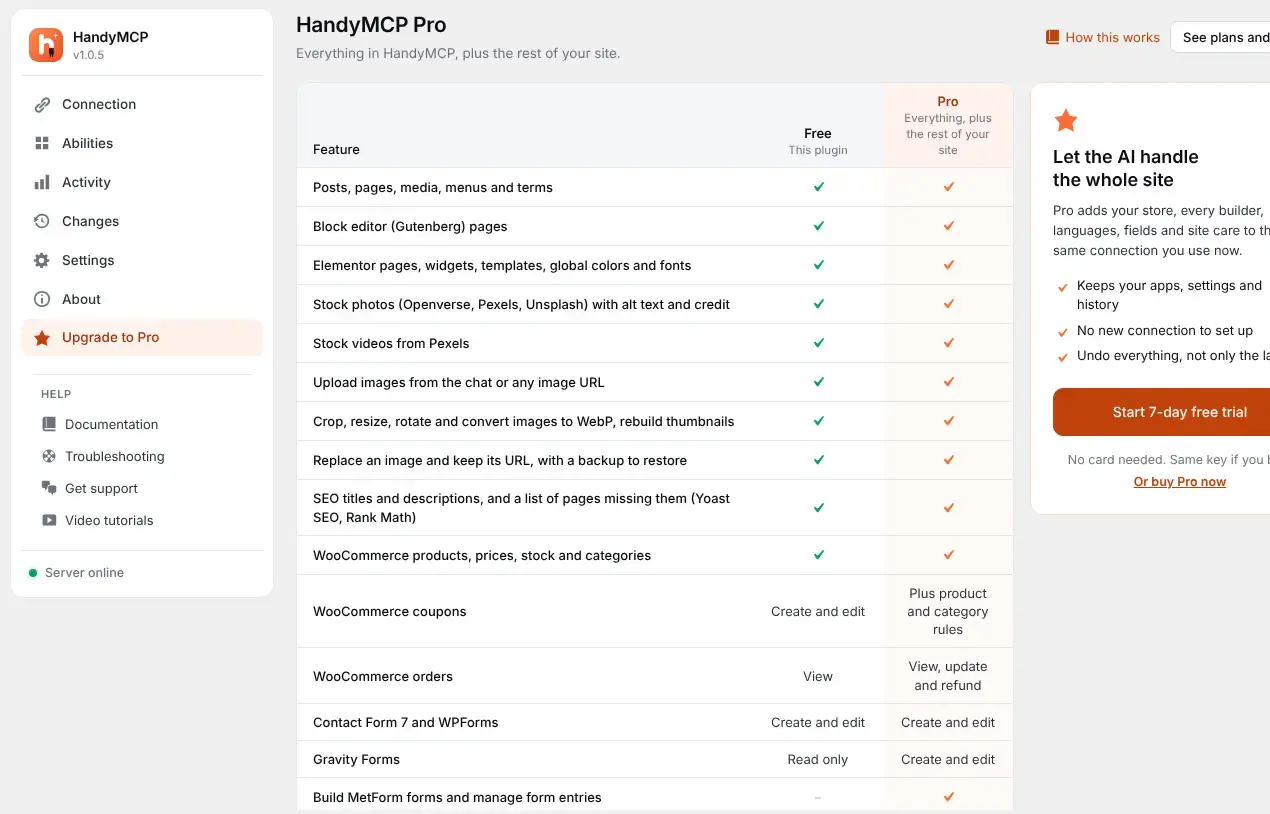
Gutenberg and Elementor in the free plugin. WPBakery, Divi, Beaver Builder, Avada and Flatsome with Pro.
Posts, pages, media, menus, titles and meta descriptions, written and updated from a chat.
Products, prices, stock, categories and coupons free. Pro adds orders, refunds, variations and every store setting.
AI changes to live pages wait for you. See the text and a live preview side by side, then approve or reject.
Plugins and themes update one at a time with a backup and a health check. Anything that breaks is rolled back.
Pick a day and time. Updates run on their own and you get a short report.
Scan for malware and spam, clean up with your approval, and manage Wordfence blocks and settings with undo.
Describe a look and get a new block theme, reviewed on a private preview link before anything goes live.
WP-CLI style commands with no shell, plus WPCode and Code Snippets with a safety check.
Translate pages and strings with WPML, Polylang and translation files.
Hide the plugin from your clients on any Pro plan. Agency adds one place to look after every client site.
Works with your builder and plugins
03The plugin
Real screens from the plugin. Everything an AI app does on your site goes through these four.
01 / 04
Copy the server URL, follow the steps for your app and watch connected apps, tokens and sessions in one place.
02 / 04
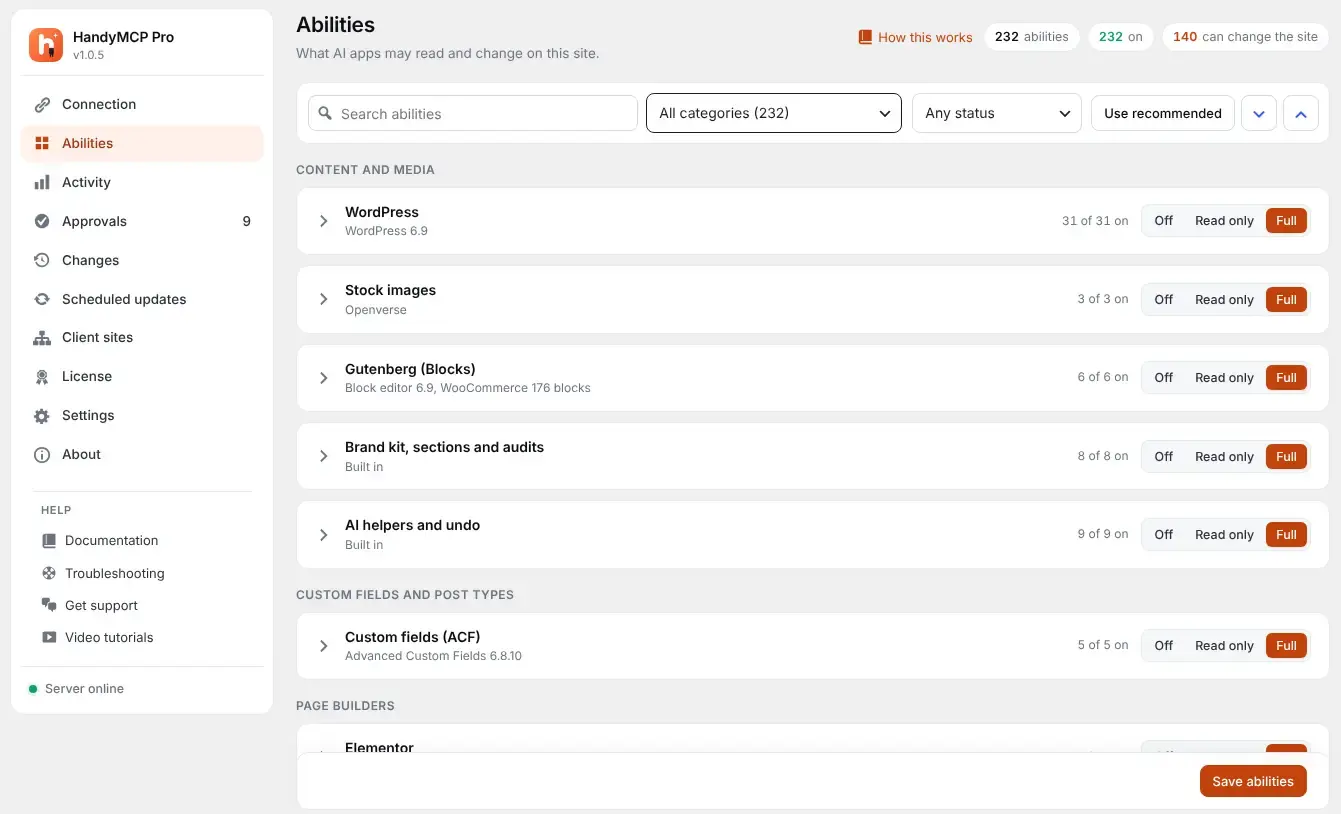
Turn abilities on group by group or one at a time. Read only for one app, full access for another.
03 / 04
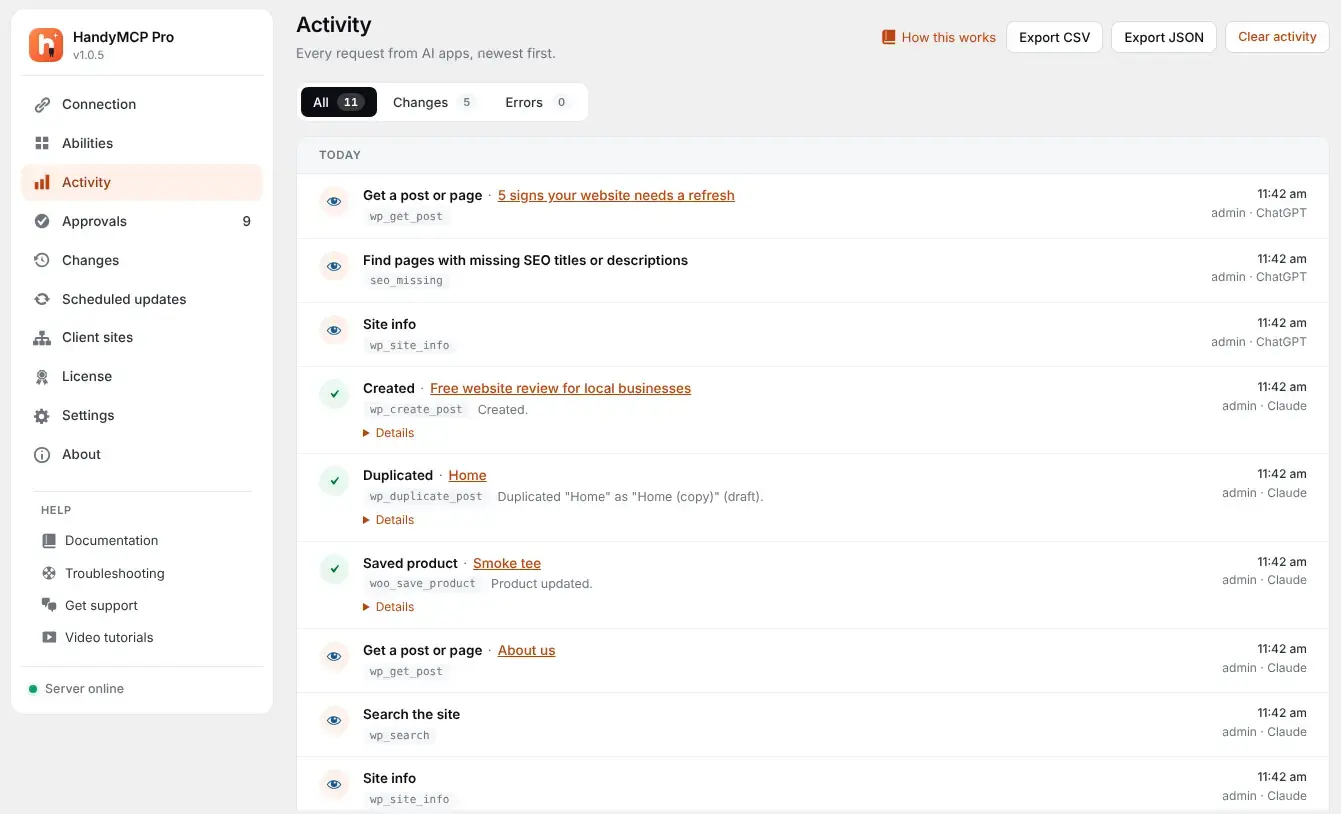
The activity log shows what each app asked for, which page it touched and when.
04 / 04
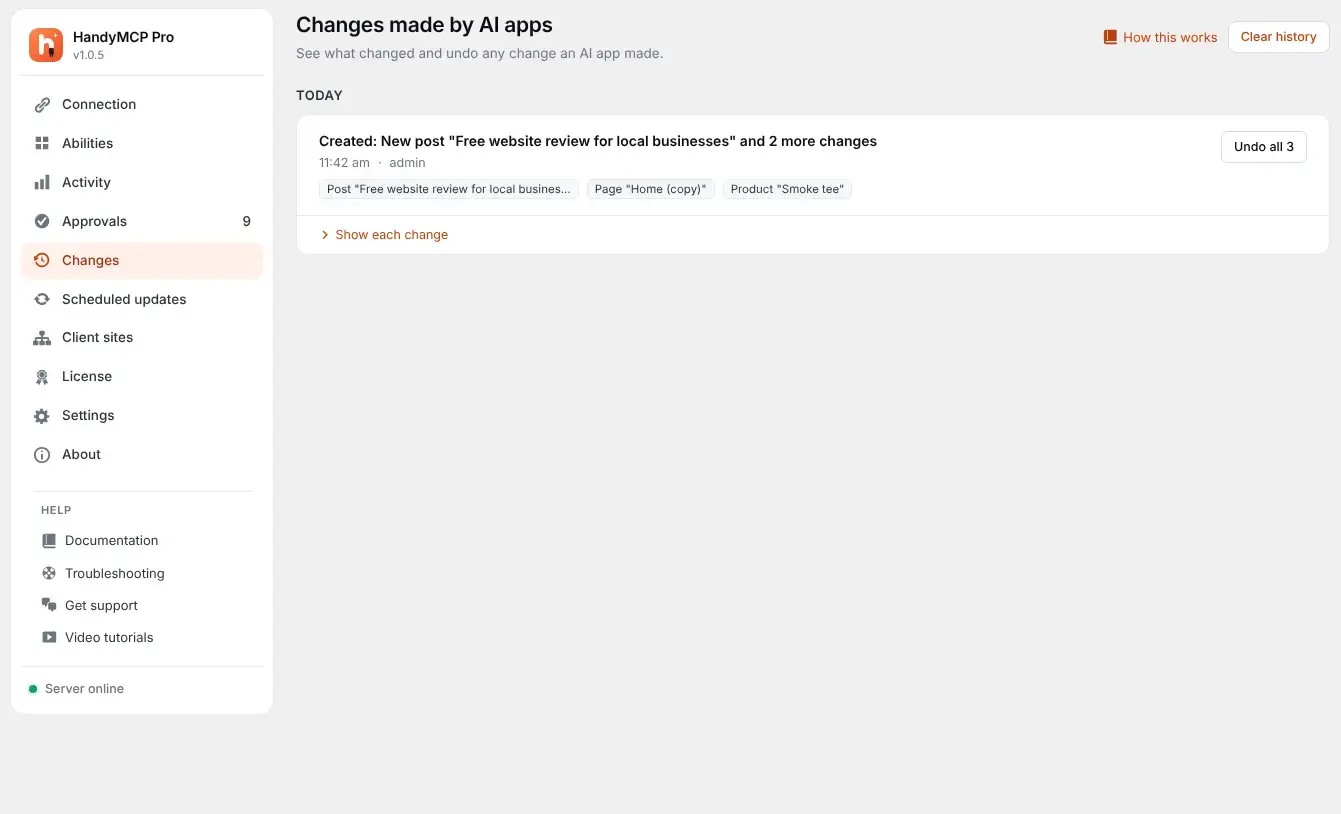
Changes are grouped by task, so you can roll back everything an AI did for one request, or a single edit.
04Why HandyMCP
Connecting an AI app to WordPress is the easy part. Trusting it on a real business site takes control, a full history and a way back. That is what HandyMCP is built around.
There is no middleman either. The MCP server is PHP that runs on your own WordPress site, and AI apps connect to it directly. No hosted relay, no extra account to create and no usage fee, so your content never passes through anyone else's servers.
| Feature | HandyMCP | Other MCP plugins |
|---|---|---|
| Pages, posts, menus and media | Yes | Yes |
| Runs on your own site, no relay or vendor account | Yes | Varies |
| No daily limits, credits or page limits | Yes | Varies |
| Works on the server, no browser or computer left on | Yes | Varies |
| Edits Elementor and other builders with real widgets | Yes | Varies |
| WooCommerce products and orders | Yes | Varies |
| Undo history grouped by task | Yes | Rare |
| Permissions per AI app, read only mode | Yes | Varies |
| Updates with backup and auto rollback (Pro) | Yes | Rare |
| Malware scan and cleanup (Pro) | Yes | Rare |
| Client sites hub (Agency) and white label (Pro) | Yes | Rare |
Based on what WordPress MCP plugins commonly offer, October 2026. Some HandyMCP features need Pro.
05Pricing
Runs on your own site, with no relay, credits or per-call fees. Pay yearly or once for life. Every paid plan has a 14-day money-back guarantee.
Try AI on your site with the essentials.
$0forever
80+ AI tools
Get started freeMost popular
Everything AI can do on your WordPress site.
$49per year
$149once, lifetime updates
$99per year
$299once, lifetime updates
300+ AI tools
Or try Pro free for 7 daysNo card needed
Everything in Free, plus:
For teams looking after many client sites.
Unlimited websites
$199per year
$499once, lifetime updates
300+ AI tools
Everything in Pro, plus:
Secure checkout by Paddle.com, our Merchant of Record, who handles invoices and sales tax. If you do not renew a yearly plan, the plugin keeps working; you just stop getting updates and support. Refund policy
| Feature | Free | Pro | Agency |
|---|---|---|---|
| Tools and limits | |||
| AI tools (abilities) available | 80+ | 300+ | 300+ |
| Websites | Unlimited | 1 or 5 | Unlimited |
| Tool calls and AI usage | No limits | No limits | No limits |
| Daily limits, credits or per-call fees | None | None | None |
| Pages, posts and products you can edit | Unlimited | Unlimited | Unlimited |
| Runs on your own site, no relay or vendor account | Included | Included | Included |
| Change history and undo | Last 20 changes | Full history | Full history |
| Before and after view of every AI change | Included | Included | Included |
| Activity log | Included | Included | Included |
| Setup checklist for a working connection in minutes | Included | Included | Included |
| Clear crash reports that name the plugin or theme at fault | Included | Included | Included |
| Pages and content | |||
| Posts, pages, menus, media, stock photos | Included | Included | Included |
| Stock videos from Pexels | Included | Included | Included |
| Upload images from the chat or any image URL | Included | Included | Included |
| Crop, resize, rotate and convert images to WebP, rebuild thumbnails | Included | Included | Included |
| Replace an image and keep its URL, with a backup to restore | Included | Included | Included |
| Gutenberg and Elementor | Included | Included | Included |
| Elementor Pro Theme Builder (headers, footers, popups) | Not included | Included | Included |
| WPBakery, Divi, Beaver Builder, Avada and Flatsome | Not included | Included | Included |
| Ready-made sections and brand kit | Not included | Included | Included |
| Theme builder: a new block theme from a prompt, with private preview | Not included | Included | Included |
| SEO titles and descriptions, and pages missing them (Yoast, Rank Math) | Included | Included | Included |
| SEO audits, search and replace, redirects | Not included | Included | Included |
| Translations (WPML, Polylang) and custom fields (ACF, JetEngine) | Not included | Included | Included |
| WooCommerce and forms | |||
| Products, prices, stock, categories | Included | Included | Included |
| Orders | Read only | Full | Full |
| Coupons | Create and edit | Plus product rules | Plus product rules |
| Refunds, variations, customers, reports | Not included | Included | Included |
| Every store setting, shipping and tax | Not included | Included | Included |
| Contact Form 7 and WPForms: create and edit | Included | Included | Included |
| Gravity Forms editing, entries from 9 form plugins | Entries only | Included | Included |
| Control and review | |||
| Site brief: your voice and rules for every AI app | Included | Included | Included |
| Approval mode: check AI changes with a live before and after preview | Not included | Included | Included |
| Protected pages AI apps cannot change | Not included | Included | Included |
| Fix with AI from your Pages, Posts and Products lists | Not included | Included | Included |
| Site care and security | |||
| Safe plugin and theme updates with automatic rollback | Not included | Included | Included |
| Scheduled updates with email reports | Not included | Included | Included |
| Backups before risky work | Not included | Included | Included |
| Malware scan and cleanup (files and database) | Not included | Included | Included |
| Wordfence: blocks, login activity and settings, with undo | Not included | Included | Included |
| WP-CLI style commands and WPCode or Code Snippets | Not included | Included | Included |
| Build custom themes and plugins, edit your own theme and plugin files with automatic restore | Not included | Included | Included |
| Cache, speed and user management | Not included | Included | Included |
| Agencies | |||
| White label: hide HandyMCP from your clients' dashboard | Not included | Included | Included |
| Client sites hub: one dashboard for every site | Not included | Not included | Included |
| Run one AI task on many sites at once | Not included | Not included | Included |
| Support | |||
| Help | WordPress.org forum | Ticket support | Priority tickets |
| Reply time | Community | 2 business days | 1 business day |
| Updates | From WordPress.org | 1 year or lifetime | 1 year or lifetime |
MCP (Model Context Protocol) is an open standard that lets AI apps use tools. HandyMCP turns your WordPress site into an MCP server, so an AI app can read and change it with the permissions you give it.
Yes. The free WordPress MCP server plugin is on WordPress.org with 80+ tools, Gutenberg and Elementor editing, WooCommerce products, an activity log and undo. It has no daily limits and needs no vendor account. Pro adds more page builders, safe plugin updates, security tools and full history.
Both. HandyMCP is written as one word, but plenty of people search for Handy MCP, Handy MCP server or Handy MCP WordPress plugin. It is the same plugin: a WordPress MCP server that lets Claude, ChatGPT and Cursor work on your site, free on WordPress.org with a Pro version at handymcp.com.
Look for four things: it runs on your own site instead of a relay, it has no daily caps, it can edit the page builder you use, and it can undo what the AI changes. Our comparison of the best WordPress MCP plugins covers the main options.
Any app that supports remote MCP servers, including Claude, ChatGPT, Cursor, VS Code and Windsurf. Claude and ChatGPT sign in with OAuth, and other apps can use an access token.
No. There are no credits, no daily limits, no page or post limits and no per-call fees, on the free plugin or on Pro. HandyMCP runs on your own site, so you can make as many requests and edit as many pages and products as you like. Your AI app may have its own message limits.
No. HandyMCP runs on your web server, not on your computer, and needs no browser extension or desktop app to stay open. Start a job from Claude or ChatGPT on your phone or laptop, and the work happens on your site. Long jobs like plugin updates keep running in the background on the server, and scheduled updates run on their own at night (Pro).
No. The MCP server is PHP that runs on your own WordPress site, and AI apps connect to it directly. There is no hosted relay, no HandyMCP account to create and your content never passes through our servers.
You choose which abilities each app has, every request is logged and content, settings and product changes can be undone in one click. Risky actions such as deleting content ask for your confirmation, a redesign goes into a draft instead of replacing the live page, and updates and code edits are health checked and rolled back automatically if something breaks.
Yes. Every change is saved before it happens. Undo one change, a whole task or every change to a page from Undo history, or just ask the AI to undo it. The free plugin keeps the last 20 changes and Pro keeps the full history.
Yes. The free plugin edits Elementor pages with real widgets, including widgets from addon packs you have installed such as ElementsKit, Happy Addons, Essential Addons, Premium Addons, JetElements and PowerPack. It picks the richest widget for each section and uses your global colours and fonts. Elementor Pro Theme Builder templates and popups need Pro.
Yes. The free plugin can create and edit products, set prices, sale prices, stock, SKUs, descriptions and images, manage product categories, create and edit coupons, look up orders and list low stock. Pro adds variations, coupon product rules, refunds, customers, reviews, sales reports and bulk price changes.
The free plugin supports Gutenberg and Elementor, including addon widgets. Pro adds Elementor Pro Theme Builder, WPBakery, Divi, Beaver Builder, Avada, Flatsome (pages, header, footer and theme options), GeneratePress Elements, Blocksy, Astra and XStore.
No. Install the plugin, paste one URL into your AI app and sign in. Then ask for what you want in plain words, like "write a draft post about our autumn hours" or "put the hoodies on sale".
By default only administrators can connect. You can allow other roles in Settings, and each person can only do what their WordPress role allows, so an Author cannot edit other people's posts.
Yes, on any host that runs WordPress 6.2 or newer and PHP 7.4 or newer over HTTPS. If a firewall or security plugin blocks the REST API, allow /wp-json/handymcp/ and run the check on the Connection screen.
HandyMCP supports WordPress sites hosted on SiteGround. SiteGround blocks some of the sign-in addresses that Claude and ChatGPT need, so many MCP plugins fail there with errors like "Couldn't register with your site's sign-in service". HandyMCP detects SiteGround and fixes this automatically, so you install the plugin, paste one URL into your AI app and sign in. Our SiteGround guide covers the details.
Yes. HandyMCP works on SiteGround, including sites with the SiteGround Security and Speed Optimizer plugins. It handles SiteGround's sign-in restrictions on its own, and the Connection screen checks your site and tells you if a cache or firewall rule still needs a change. No code, no .htaccess edits and no support ticket are needed.
No. HandyMCP Pro is a complete plugin. When you install it, it takes over from the free version and keeps your settings and history.
The plugin keeps working on your site. You stop getting updates and support until you renew, and renewing is up to you.
Yes. Deactivate it on the old site, or remove that site in your account, then activate it on the new one.
Yes. If HandyMCP Pro is not right for you, ask for a full refund within 14 days of purchase.
Our order process is conducted by our online reseller Paddle.com. Paddle is the Merchant of Record for all our orders and handles payments, invoices and sales tax.
14-day money-back guarantee
Connect your site in a few minutes. Every change is logged, and site edits can be undone in one click.
 HandyMCP support
Usually replies within a few hours
Today
Hi, thanks for checking out HandyMCP.
Ask anything about the plugin, plans or setup. We reply on WhatsApp.