
If you are comparing WordPress MCP plugins, free or paid, you have more choice in 2026 than a year ago. Some plugins are all-in-one AI toolkits. Some are small and focused. One is an official core team project for developers. They all let an AI app like Claude or ChatGPT work with your site, but they make very different trade-offs.
One thing up front: we make HandyMCP, one of the plugins in this list. We have tried to be fair and to stick to what each plugin says about itself. Features and prices change quickly, so check each plugin’s current page before you decide.
Quick answer: There is no single best WordPress MCP plugin for everyone. AI Engine suits people who want chatbots and AI writing tools plus MCP in one plugin. The official WordPress MCP Adapter suits developers building their own abilities. HandyMCP is built for safe editing of live sites, with undo, page builders and WooCommerce, and runs on your own site with no relay.
What WordPress MCP plugins do
MCP (Model Context Protocol) is an open standard that lets AI apps use tools. A WordPress MCP plugin turns your site into an MCP server. The AI app connects to it and can then read posts, edit pages, update products or check settings, depending on which tools the plugin provides and what you allow.
Without one, you copy and paste between the chat window and wp-admin. With one, you ask in plain words and the AI does the work on the site. If you want the background, read what MCP is in WordPress.
How we compared
We looked at each plugin against the same criteria. These are the questions that matter most once you use AI on a real site, not a test install.
- Where it runs. On your own site, or through a hosted relay that sits between the AI and your site.
- Scope. A focused MCP server, or part of a bigger AI plugin.
- Page builders. Can it edit Elementor and other builders natively, widget by widget?
- Store tools. How much of WooCommerce it covers.
- Safety. Permissions, confirmation for destructive actions, an activity log and undo.
- Who it is for. Site owners, agencies or developers.
- Pricing model. Free, flat price, or tied to usage.
We used each plugin’s own WordPress.org page, website or announcement as the source. We did not run benchmarks, and we have not included user counts or ratings we could not confirm.
WordPress MCP plugins at a glance
| Plugin | Best for | Where it runs | What stands out |
|---|---|---|---|
| AI Engine (Meow Apps) | All-in-one AI features plus MCP | Your site | Chatbots, content tools and an MCP server in one plugin. 90,000+ installs on WordPress.org. |
| WordPress MCP Adapter | Developers | Your site | Official core team project. Turns Abilities API abilities into MCP tools. Announced February 2026. |
| Royal MCP | A large free toolset | Your site | Free, self-hosted, 200+ tools. |
| Easy MCP AI | SEO-minded site owners | Your site | Free, many tools plus SEO data integrations (GA4, Search Console, SEO vendors with your own accounts). |
| Secure MCP Server (miniOrange) | Role-based permissions | Your site | Free, different tool sets per WordPress role, OAuth 2.1. |
| WPVibe | People who prefer a hosted setup | Hosted relay | Approval step for destructive actions. Needs a WPVibe account, with a daily cap on tool calls on every plan. |
| Novamira | Developers on staging sites | Your site | Low-level access (PHP, files, database). The vendor recommends staging only. |
| Cowboy MCP | A small free option with undo | Your site | Small free plugin with a change journal and undo. |
| Elementor MCP | New Atomic Editor builds | Elementor | Elementor’s own MCP, in beta since September 2026. Needs the Atomic Editor. |
| HandyMCP (ours) | Safe edits on live client and business sites | Your site, no relay | Undo by task, native Elementor with addon packs, WooCommerce, drafts for redesigns, activity log. |
WooCommerce also has official MCP work under way, which is worth watching if your site is mainly a store.
AI Engine
AI Engine by Meow Apps is a broad AI plugin. It includes chatbots, content tools and an MCP server, and it has 90,000+ installs on WordPress.org. If you want AI features for your visitors, like a chatbot, as well as an MCP connection for yourself, having them in one plugin is convenient.
Check its current page for exactly which MCP tools it offers and how it handles builders and stores. We also wrote a direct comparison: HandyMCP vs AI Engine.
WordPress MCP Adapter
The MCP Adapter is the official WordPress project. It takes abilities registered through the Abilities API and exposes them as MCP tools. That makes it a foundation more than a finished product: it is strongest when you or the plugins you use register abilities.
It is a good fit for developers and teams who want to build their own tools on a standard base. For how it differs from ready-made plugins and hosted relays, read MCP Adapter vs plugins vs relays. HandyMCP can also list and run abilities that other plugins register through the Abilities API, so the two approaches can work together.
Royal MCP
Royal MCP is free and self-hosted, with 200+ tools. If you want a wide toolset at no cost and are comfortable reviewing what each tool does, it is worth a look. Check its page for its current safety and undo features.
Easy MCP AI
Easy MCP AI is a free, self-hosted plugin with a large toolset plus integrations with SEO data such as GA4 and Search Console. The SEO vendor tools need your own paid accounts with those vendors. It does not build pages in a page builder. If your main use is SEO work and you want that data in the chat, it is a sensible one to try.
Secure MCP Server (miniOrange)
Secure MCP Server is free and self-hosted. Its standout idea is role-based permissions: different WordPress roles get different tool sets. That suits teams where editors and admins should not have the same AI access. It is newer, so test the role mapping on a staging copy first.
Novamira
Novamira gives the AI low-level abilities like running PHP and reading and writing files and the database. That is powerful for developers, and the vendor itself says to use it on development and staging sites with backups. It is not a tool for editing a live business site.
WPVibe
WPVibe runs through a hosted relay. Your AI app talks to the relay, and the relay talks to your site. Some people like the hosted setup. It asks for approval before destructive actions. You need a WPVibe account, and every plan, including the free one, has a daily limit on tool calls. If you would rather not have a third party between the AI and your site, look at self-hosted options instead.
Cowboy MCP
Cowboy MCP is a small free plugin with a change journal and undo. If you only need a light connection and like having undo, it is a simple choice.
Elementor’s own MCP
Elementor opened a beta of its own MCP in September 2026. It needs the Atomic Editor. If your site is built with the standard Elementor editor, see how to edit Elementor pages with AI without the Atomic Editor.
HandyMCP
This is our plugin, so read this part knowing that. HandyMCP runs on your own site with no relay, no vendor account and no usage fee or limits. It is built around working safely on live sites.
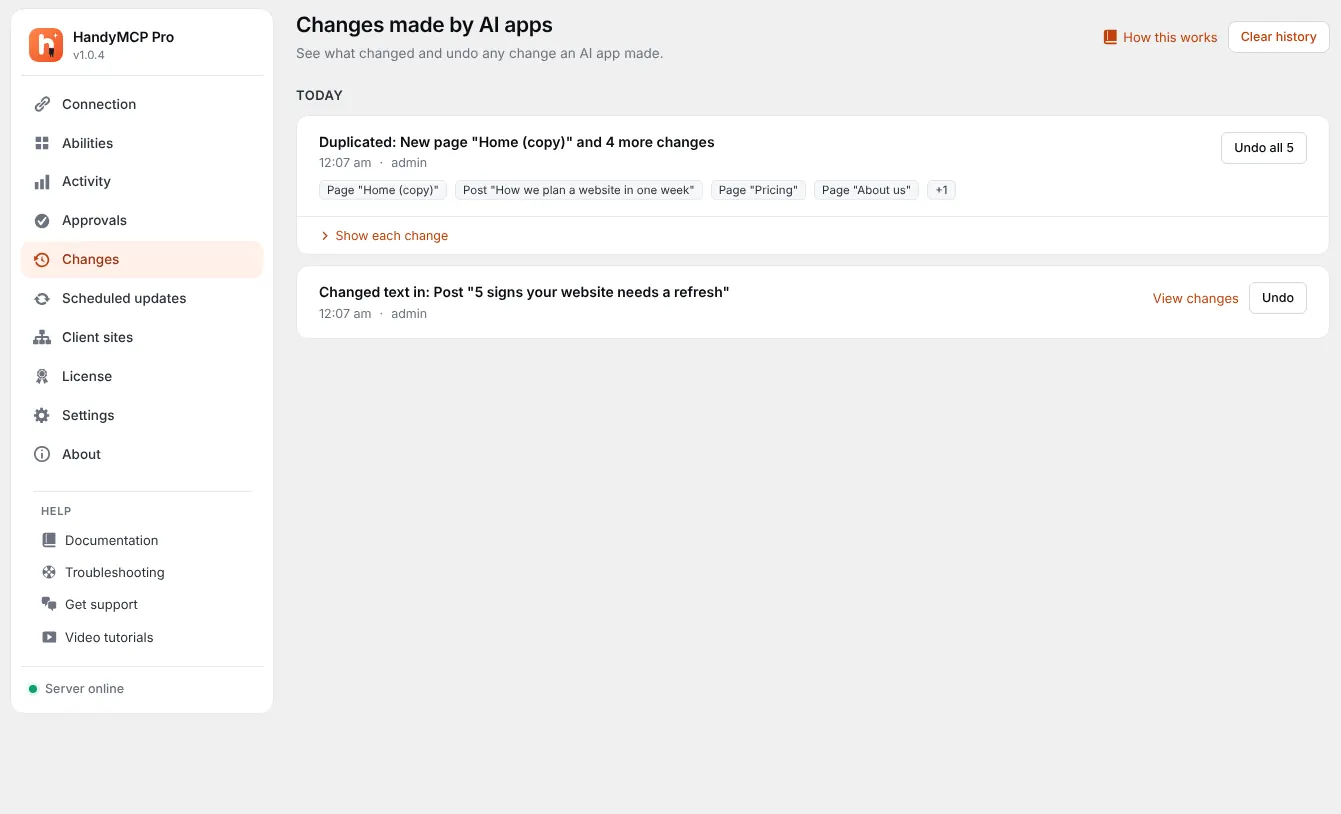
- Undo: every change is saved first. Undo one change, a whole task, or everything on a page. Free keeps the last 20 changes, Pro keeps full history.
- Live page guard: redesigns become a draft copy. A published page is only replaced when you clearly ask.
- Elementor: native widget editing in the free version, including addon packs such as ElementsKit, Happy Addons and Essential Addons. Pro adds Theme Builder, other builders like Divi, WPBakery, Beaver Builder and Avada.
- WooCommerce: product basics, categories, orders and a low stock report free. Pro adds variations, coupons, refunds, reports and bulk price updates.
- Control: OAuth 2.1 or access tokens, scopes, read only mode, tool switches and an Activity log.
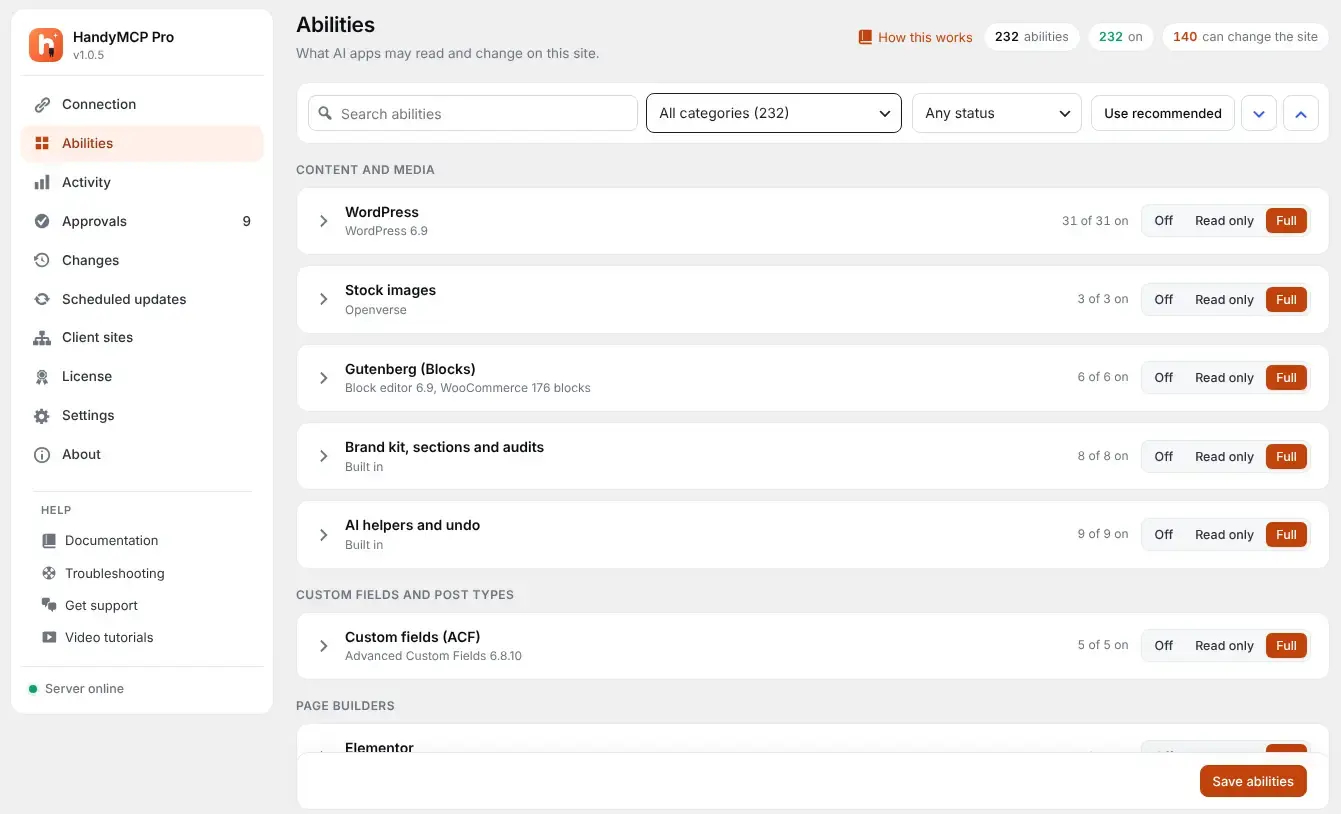
The free version has 80+ tools. Pro has 260+. See pricing.
The best free WordPress MCP plugins
If you only want a free WordPress MCP plugin, the real question is what “free” includes. Some free plans cap how many actions the AI can take per day, need an account with the vendor, or leave out page builders. Here is how the free versions compare on the points people ask about most.
| Free version | Daily limit | Vendor account | Page builder editing | Undo |
|---|---|---|---|---|
| HandyMCP | None | No | Gutenberg and Elementor, including addon widgets | Yes, last 20 changes |
| AI Engine | None from the plugin (your AI provider may charge) | No | Check its page | Check its page |
| Royal MCP | Rate limit per minute | No | Elementor and Divi integrations | Undo token for destructive writes |
| Easy MCP AI | None | No | No page building | Change history |
| WPVibe | Yes, daily tool-call cap | Yes | Its own theme builder | Approval before destructive actions |
Details are from each vendor’s own pages and can change, so check before you install.
Quick picks: WordPress MCP plugins by need
- Best WordPress MCP plugins for live business sites: HandyMCP.
- Best WordPress MCP plugins for AI features plus MCP: AI Engine.
- Best WordPress MCP plugins for developers: the MCP Adapter.
- Best WordPress MCP plugins for a big free toolset: Royal MCP.
- Best WordPress MCP plugins for SEO data: Easy MCP AI.
- Best WordPress MCP plugins for per-role tools: Secure MCP Server.
- Best WordPress MCP plugins for a hosted setup: WPVibe.
- Best WordPress MCP plugins for staging-only power tools: Novamira.
Self-hosted vs relay: why it matters
A self-hosted MCP server runs inside your WordPress install. The AI app connects straight to your site. A relay adds a service in the middle. Neither is wrong, but think about who can see your requests, whether there is a usage limit, and what happens if the relay is down. For client sites, many agencies prefer self-hosted for these reasons.
Which WordPress MCP plugins suit which job
Most WordPress MCP plugins are good at something. The trick is matching the plugin to the work you do most.
- You want chatbots and AI writing inside WordPress too: AI Engine.
- You are a developer building custom abilities: the MCP Adapter.
- You want lots of free tools: Royal MCP.
- You want SEO data in the chat: Easy MCP AI.
- You prefer a hosted service: WPVibe.
- You run client or business sites and need undo, builders and a store: HandyMCP.
How to test WordPress MCP plugins before you commit
Reading feature lists only goes so far. The best way to compare WordPress MCP plugins is a short, fair test on a copy of your real site. Here is a routine that takes about an hour per plugin.
- Make a staging copy with your real theme, builder and plugins. Blank test sites hide most of the differences between WordPress MCP plugins.
- Connect one plugin at a time. Deactivate the others, because two WordPress MCP plugins answering at once confuse the AI.
- Run the same five prompts on each: list pages missing a meta description, change a heading on a builder page, create a draft post, edit a product price, and undo the last change.
- Note what happened. Did it finish? Did it ask before risky steps? Could you undo it? How many tool calls did it take?
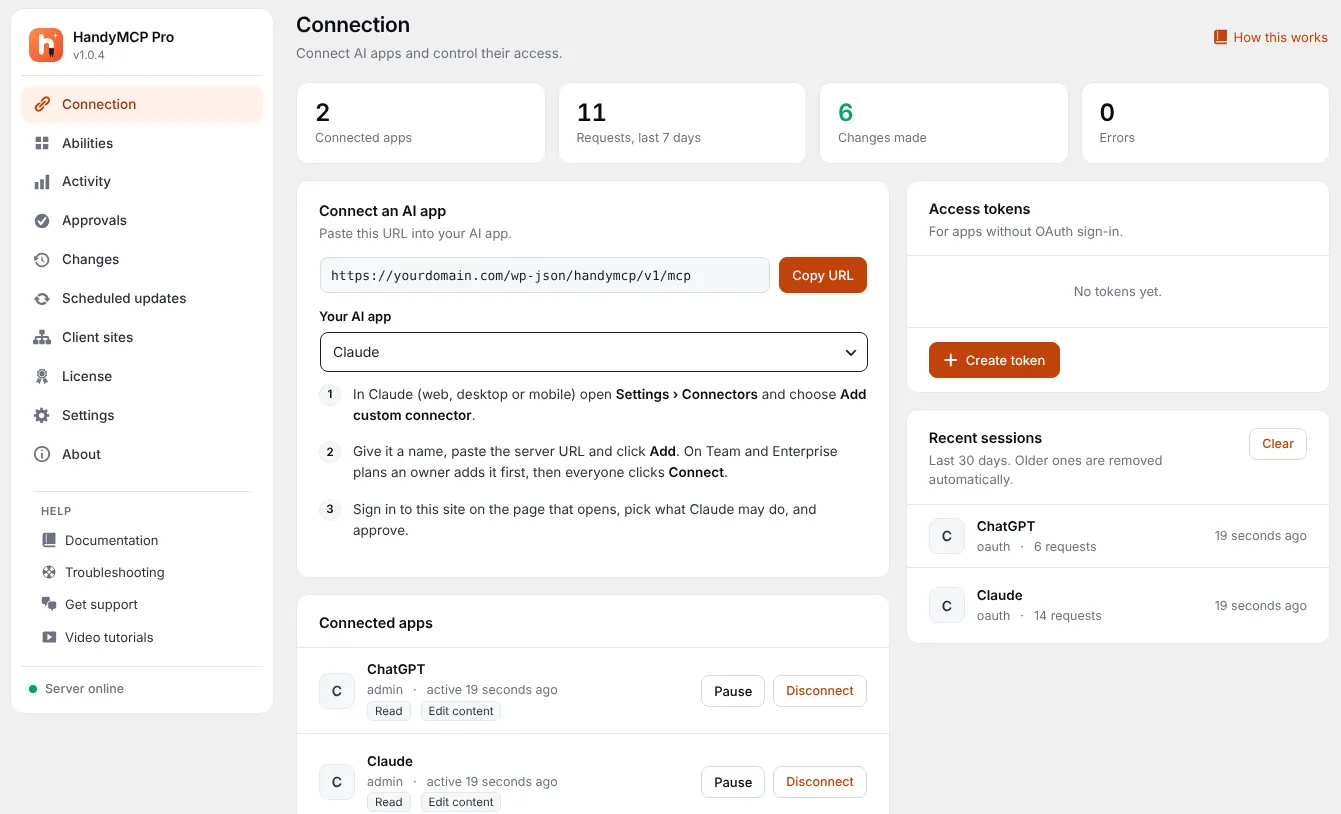
- Check the logs. Good WordPress MCP plugins show you every request in plain words.
Score each plugin on the jobs you actually do. A plugin that wins on tool count can lose badly on the one task you need every day.
Questions to ask any vendor
Before you install WordPress MCP plugins on a client or business site, ask the vendor (or check their docs) for clear answers to these:
- Does the plugin run entirely on my site, or does traffic pass through your servers?
- Is there a daily or monthly cap on tool calls?
- Which actions need my confirmation before they run?
- Can I undo builder layouts, menus and products, or only post text?
- How are API keys and customer data protected from the AI?
- Which WordPress roles can connect, and can I limit tools per role?
- How often is the plugin updated, and does it follow the latest MCP version?
The answers tell you more than any comparison table. WordPress MCP plugins that answer clearly and publicly are usually the ones built with care.
Where WordPress MCP plugins are heading
Three trends are shaping WordPress MCP plugins this year. First, the official Abilities API gives plugins a shared way to describe what they can do, so more plugins will offer AI tools without a separate MCP plugin. Second, page builders are adding their own AI layers, starting with Elementor. Third, the MCP standard itself keeps moving, with newer versions changing how apps sign in. Expect the best WordPress MCP plugins to support abilities from other plugins and keep up with new MCP versions quickly.
Mistakes to avoid when choosing WordPress MCP plugins
- Counting tools only. More tools are not better if the ones you need are missing or unsafe.
- Skipping the undo question. Ask what happens when the AI gets it wrong.
- Testing on a blank site. Try it on a copy of a real site with your builder and plugins.
- Running two MCP plugins at once. Overlapping tools confuse the AI. Pick one per site.
- Ignoring permissions. Check which WordPress roles can connect and what they can do.
Frequently asked questions
What is the best WordPress MCP plugin?
It depends on the job. For safe editing of live sites with page builders and WooCommerce, we built HandyMCP. For an all-in-one AI plugin, look at AI Engine. For custom development, the official MCP Adapter.
What is the best free WordPress MCP server plugin?
For editing a live site, HandyMCP’s free version has no daily limits, no vendor account, Elementor editing and undo. For SEO data in the chat, Easy MCP AI. For a big free toolset, Royal MCP.
Are WordPress MCP plugins free?
Most have a free version. HandyMCP’s free version has no usage limits, and Pro adds more builders, store tools and full history.
Do I need a relay service?
No. Self-hosted plugins run the MCP server on your own site, and AI apps connect directly.
Can I run two WordPress MCP plugins at once?
You can, but overlapping tools confuse the AI. Pick one of the WordPress MCP plugins per site and deactivate the rest.
Do WordPress MCP plugins slow down my site?
Not for visitors. WordPress MCP plugins only do work when an AI app sends a request, so normal page loads are unaffected.
Do WordPress MCP plugins work with any theme?
Yes for posts, pages, menus and settings. Builder editing depends on the plugin, so check that your builder is supported.
Which AI apps work with these plugins?
Any MCP client should work, including Claude, ChatGPT, Claude Code, Cursor, VS Code, Windsurf and Gemini CLI. Check each plugin’s page for its tested apps.
Does the official MCP Adapter replace these plugins?
Not on its own. It exposes abilities that are registered on the site. Plugins can register abilities, and HandyMCP can run them too.
Is it safe to use an MCP plugin on a live site?
It can be, with the right controls. Read is it safe to let AI edit a live WordPress site.
Want to try HandyMCP? Install the free version and connect it to Claude in a few minutes.