
You have probably seen “MCP” mentioned next to Claude, ChatGPT and Cursor, often by people who assume you already know what it means. If you run a WordPress site, it is worth ten minutes to understand, because it changes how AI can help with your site.
This guide explains what MCP is for WordPress owners in plain English, with no developer background needed. You will learn what it does, how it works, what it is good for, what to watch out for and how to try it.
Quick answer: MCP (Model Context Protocol) is an open standard that lets AI apps use tools inside other software. For WordPress, an MCP server is a plugin that offers tools like “create a page” or “update a product price”. Apps such as Claude, ChatGPT or Cursor connect to it with a sign-in, and when you ask for something in plain words, they use those tools to do the job on your site.
What is MCP?
MCP stands for Model Context Protocol. It was introduced by Anthropic in late 2024 as an open standard, and many AI apps now support it. The official site is modelcontextprotocol.io.
A “protocol” is just an agreed way of talking. Email works because every email app follows the same rules. MCP does the same for AI apps and tools: any app that speaks MCP can use any tool that speaks MCP.
Before MCP, every AI company had to build its own connection to every piece of software. With MCP, a WordPress plugin can offer its tools once, and many AI apps can use them.
An everyday comparison
Think of an AI app as a capable assistant who has never been to your office. MCP is the set of keys and instructions you hand over. This key opens the filing cabinet. This one opens the till. That door stays locked.
The assistant can only use the keys you gave it. If you take a key back, that door is closed again. A good MCP server also writes down every door the assistant opened, and lets you put things back the way they were.
How MCP works with WordPress, in four parts
- The AI app (the client). Claude, ChatGPT, Claude Code, Cursor, VS Code, Windsurf, Gemini CLI and others.
- The MCP server. On WordPress, this is a plugin such as HandyMCP. It lists the tools and runs them on your site.
- The tools. Named actions with clear inputs, such as “update the title of post 42” or “list products with low stock”.
- Your permission. You sign in and choose what the app may do.
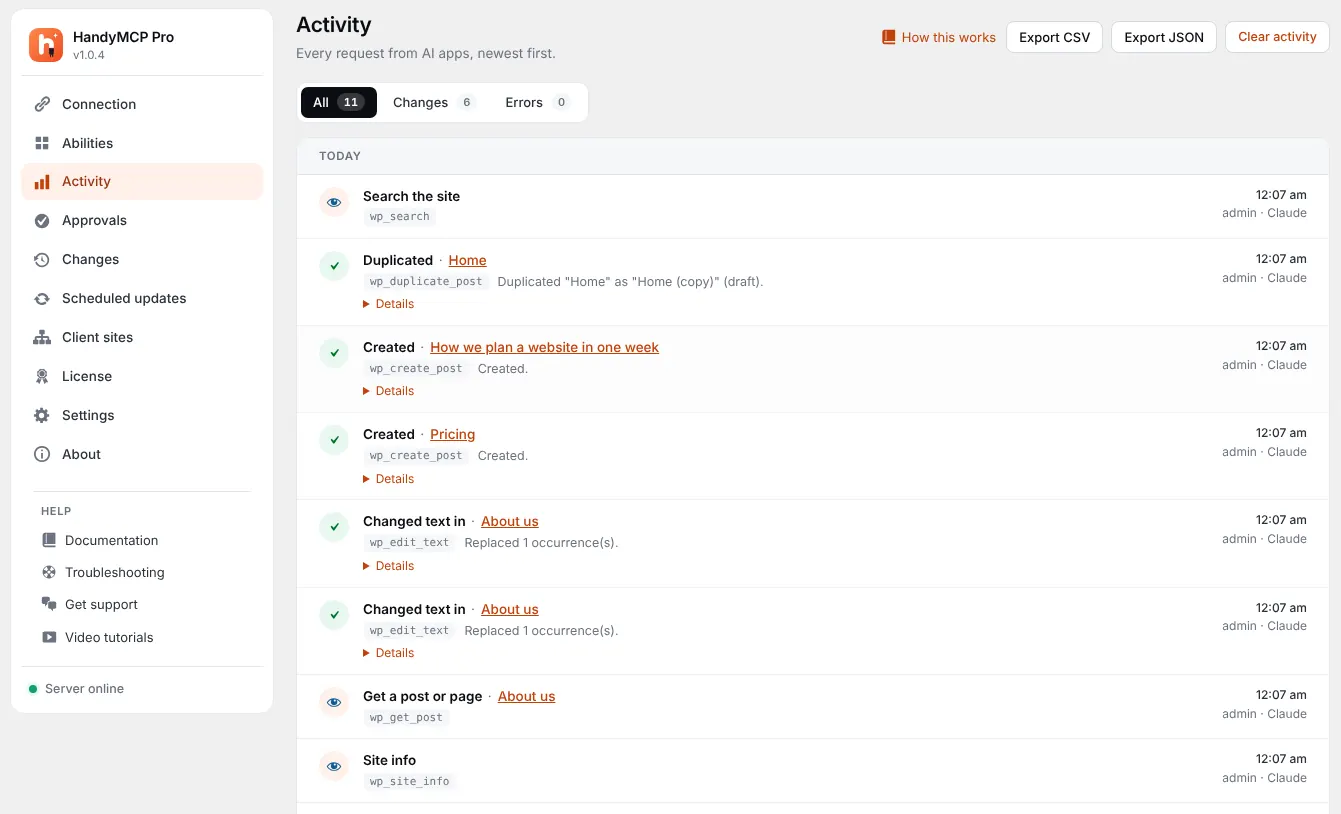
When you type “fix the typo in the About page heading”, the AI app picks the right tool, the server checks you are allowed to do that, makes the change and reports back. You did not open the editor at all.
Why MCP matters for WordPress owners
- Less clicking. Describe the job instead of doing it screen by screen.
- Bulk work gets easy. Writing 50 meta descriptions or changing prices across a product category becomes one request.
- Any AI app. MCP is open, so you are not tied to one vendor. Use Claude today and ChatGPT tomorrow.
- Real actions, not just text. A chatbot can tell you how to change a menu. An AI connected through MCP can change it.
- New things to manage. Access, mistakes and logs. A good server handles these for you.
MCP vs the WordPress REST API
WordPress already has a REST API, so why do we need MCP? The REST API is built for developers. It is a list of web addresses that return data, and you need to know which one to call and what to send.
MCP describes tools in a way AI apps understand: what each tool is for, what it needs and what it returns. A WordPress MCP server usually uses WordPress functions behind the scenes. The AI does not need to know the details. It just picks the right tool.
| REST API | MCP | |
|---|---|---|
| Built for | Developers and apps | AI apps |
| You need to code | Usually | No |
| Describes what each action is for | Partly | Yes |
| How you use it | Write requests | Ask in plain words |
There is also a newer WordPress project worth knowing about. The official WordPress MCP Adapter, from the core team, turns abilities registered with the Abilities API into MCP tools. It was announced on developer.wordpress.org in February 2026. We compare the options in MCP Adapter vs plugins vs relays.
What you can do with MCP on WordPress
Here are real examples of the kind of request MCP makes possible:
Change the phone number in the footer and on the Contact page to 01234 567890.Write SEO meta descriptions for every blog post that does not have one.Build a landing page for our spring sale in Elementor, as a draft.List products with fewer than five in stock.Add a "Gallery" link to the main menu, after "About".More ideas are on the prompts page. For page builder work, see edit Elementor pages with AI, and for stores, WooCommerce MCP.
Types of WordPress MCP servers
Plugins that run on your site
The MCP server is a plugin on your own WordPress site. The AI app connects straight to your site. HandyMCP works this way: no relay, no vendor account and no usage fee or limits.
Hosted relays
Your site connects to a service run by a company, and the AI app connects to that service. This can be easy to set up, but your requests pass through someone else’s server.
The official adapter
The WordPress MCP Adapter exposes abilities from the Abilities API. It is a developer-focused building block. HandyMCP can also list and run abilities registered by other plugins through the Abilities API.
For a wider comparison, read the best WordPress MCP plugins.
Prerequisites to try MCP on WordPress
- WordPress 6.2 or newer and PHP 7.4 or newer.
- HTTPS on your site.
- An administrator account.
- An AI app that supports MCP connectors.
Step by step: connect your first AI app
- Install the plugin. Install HandyMCP and activate it. The install guide has the details.
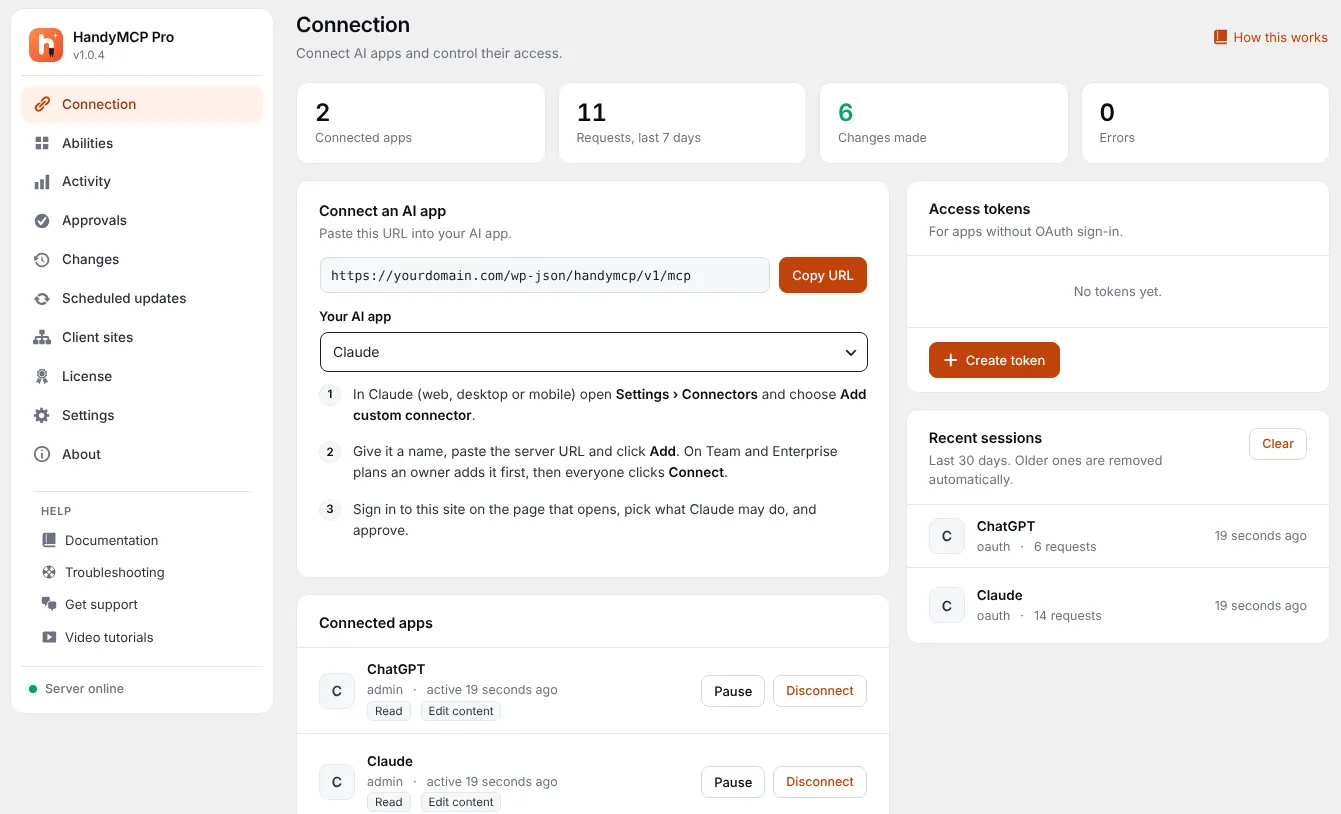
- Open the Connection screen. Go to HandyMCP > Connection. Copy the server URL, which looks like
https://your-site.com/wp-json/handymcp/v1/mcp. - Add it to your AI app. In Claude, go to Settings > Connectors > Add custom connector. In ChatGPT, go to Settings > Apps, turn on Developer mode and create an app. Menu names can change, so check the app’s own help if a label looks different.
- Sign in and pick scopes. A consent page opens on your own site. Choose what the app may do: read only, edit content, manage the store or manage the site.
- Try a safe first request. Something read only, like “list my five most recent posts”.
Full walk-throughs: connect Claude, connect ChatGPT and connect Cursor.
Is MCP safe for a WordPress site?
MCP itself is just the way the app and server talk. Safety depends on the server you choose. Here is what to look for, and how HandyMCP handles each one:
- Proper sign-in. OAuth 2.1 with PKCE, or personal access tokens that are stored hashed, shown once and can be revoked. Cookie login is never accepted by the MCP endpoint.
- Role limits. Each user can only do what their WordPress role allows.
- Control over tools. Switch off tool groups or single tools, or use read only mode.
- Confirmation. Destructive actions need your explicit agreement.
- Live page guard. A “redesign” or “draft” request creates a draft copy instead of replacing the published page.
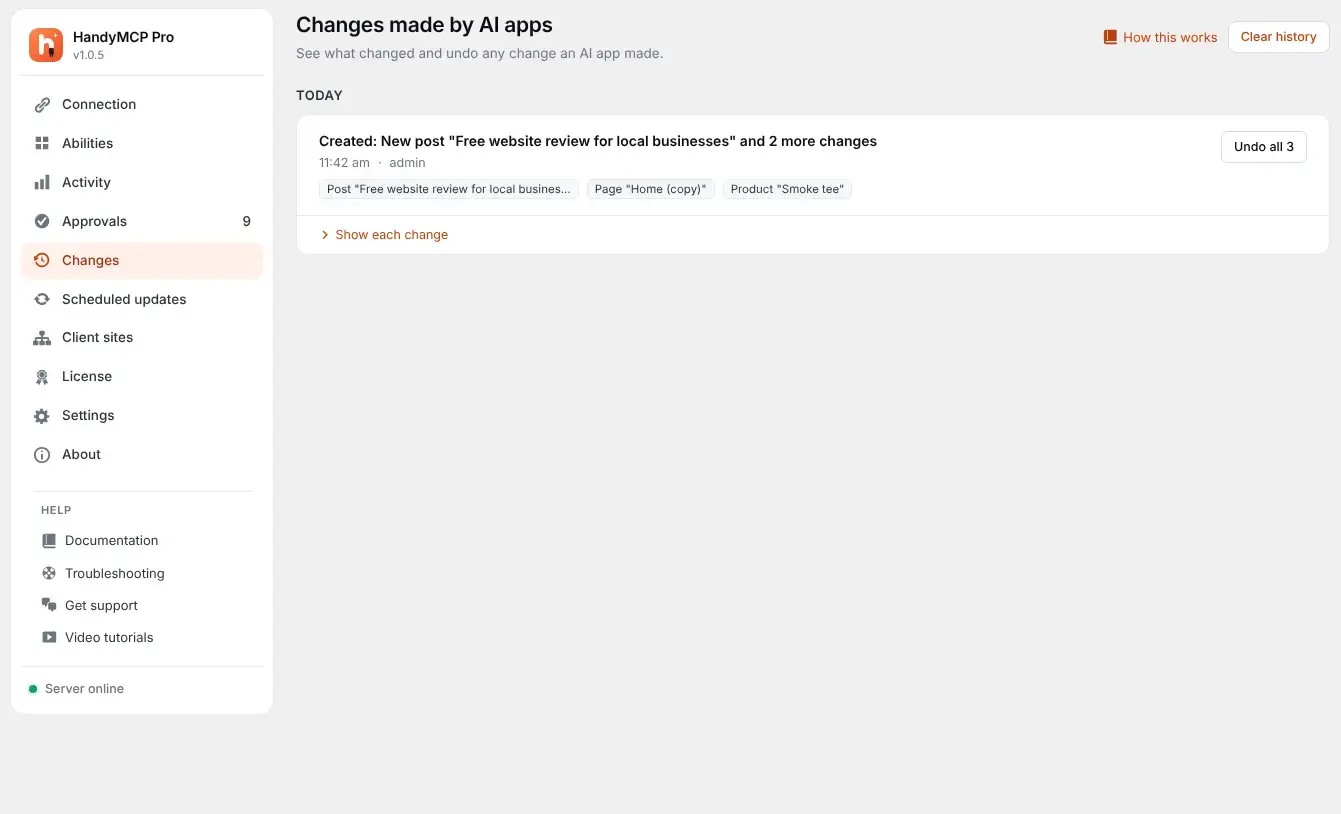
- Logs and undo. Every request is logged, and every change can be undone.
- Prompt injection protection. Site content is treated as data, not instructions.
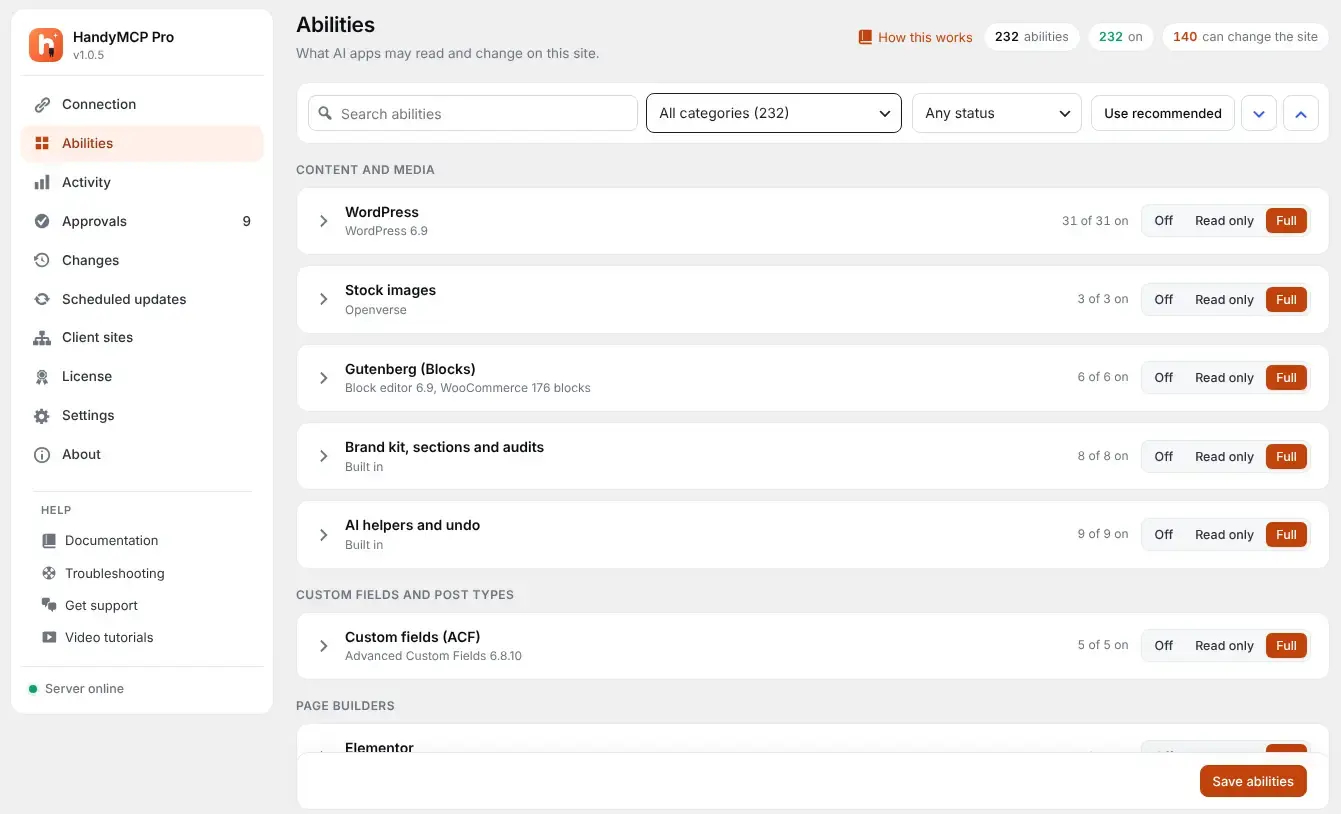
More detail in is it safe to let AI edit a live WordPress site.
What is MCP doing behind the scenes?
You do not need to know this to use it, but it helps to picture the steps. When people ask “what is MCP actually doing?”, the answer is a short conversation between the AI app and your site:
- Hello. The app connects to the server URL and both sides agree which MCP version they speak.
- Sign-in. The app proves it is allowed in, using the sign-in you approved.
- Tool list. The server sends a list of tools, each with a name, a short description and the inputs it needs.
- Your request. You type what you want. The AI reads the tool list and picks the tools that fit.
- Tool call. The app sends the tool name and inputs. The server checks permissions, runs it and returns the result.
- Answer. The AI reads the result and tells you what happened, or calls another tool if the job needs more steps.
What is MCP good at, and what is it not?
| Good fit | Poor fit |
|---|---|
| Repeated tasks across many posts or products | Pixel-perfect design work you want to judge by eye |
| Finding things: missing images, empty fields, broken links | Tasks with no clear right answer that need a human decision |
| Small precise edits on named pages | Vague requests like “make the site better” |
| Drafting content you will review | Publishing sensitive content without review |
So what is MCP best for? Work you could describe clearly to a careful assistant. If you can say it in two sentences, MCP can usually do it.
What is MCP going to change for WordPress?
A few changes are already visible. Plugins are starting to describe their features as abilities that any AI app can use. Page builders are adding AI layers of their own. Hosts are learning to let AI apps through their firewalls. Over the next year, expect “connect your AI” to sit next to “install a plugin” as a normal first step on a new site.
For site owners, the practical point is simple. What is MCP worth to you? Mostly time: fewer clicks for routine work, and help with jobs you used to put off.
What is MCP vocabulary? A short glossary
- Client: the AI app, such as Claude or ChatGPT.
- Server: the plugin on your site that offers tools.
- Tool: one named action, like “update post”.
- Scope: a group of permissions you approve at sign-in.
- Connector: Claude’s word for a saved MCP server.
- Access token: a long secret that lets an app connect without the sign-in page.
- Abilities API: a WordPress feature that lets plugins describe their actions for AI apps.
What is MCP compared with other AI tools?
What is MCP vs a chatbot plugin?
A chatbot plugin talks to your visitors. So what is MCP by contrast? It lets your own AI app work on the site for you. Many sites use both.
What is MCP vs an AI writing plugin?
An AI writing plugin adds a button inside the editor. What is MCP doing differently? It works from the chat you already use and can touch any part of the site the tools allow, not just the open post.
What is MCP vs Zapier or automation tools?
Automation tools follow fixed recipes you build. What is MCP good at here? Choosing the right tool for each request on the fly, with no recipe to set up.
What is MCP vs a custom GPT with actions?
A custom GPT with actions works only in ChatGPT and needs its own setup. What is MCP offering instead? One server URL that Claude, ChatGPT, Cursor and others all understand.
What is MCP checklist for beginners
- Understand what is MCP: a connection, not an AI model.
- Pick a server plugin that runs on your own site.
- Connect one AI app and start read only.
- Ask what is MCP able to do on your site: request the tool list.
- Try one small edit and check it in the Activity log.
- Learn where undo lives before you need it.
Common misunderstandings
- “MCP is an AI model.” It is not. It is the connection between an AI app and tools.
- “The AI can do anything once connected.” It can only use the tools the server offers, within your permissions.
- “I need to be a developer.” You install a plugin, paste a URL and sign in.
- “It only works with one AI company.” MCP is open and works across many apps.
Troubleshooting your first connection
- The app cannot reach the site. Check HTTPS, the exact URL, and whether a firewall blocks the REST API.
- Sign-in fails. Make sure you are logged in as an administrator, or that your role is allowed in Settings.
- A tool is missing. It may be switched off, or it may be part of Pro.
See WordPress MCP not connecting for more fixes.
Free vs Pro
The free HandyMCP plugin covers posts, pages, menus, media, Gutenberg, Elementor, SEO fields in Yoast or Rank Math, WooCommerce basics, the Activity log and undo for the last 20 changes. Pro adds other page builders, full WooCommerce, plugin updates, malware scanning, file editing and full undo history. See pricing.
Frequently asked questions
What is MCP in simple words?
A shared language that lets AI apps use tools in other software. On WordPress, it lets Claude or ChatGPT edit your site with your permission.
What is MCP short for?
Model Context Protocol.
What is MCP used for on a WordPress site?
Writing and editing posts, updating pages and builder layouts, filling SEO fields, managing products and checking site health, all from a chat.
What is MCP server vs MCP client?
The server is the plugin on your site that offers tools. The client is the AI app that uses them.
What is MCP going to cost me?
The protocol is free. You pay for your AI app plan, and optionally for a Pro server plugin. HandyMCP’s free version has no usage fees.
What is MCP version 2026-07-28?
The newest version of the standard, which changes how apps sign in. HandyMCP supports it alongside older versions.
Who created MCP?
Anthropic introduced MCP in late 2024 as an open standard. Many AI apps and companies now support it.
Is MCP the same as the WordPress REST API?
No. The REST API is for developers. MCP describes tools in a way AI apps understand, and a WordPress MCP server usually uses WordPress functions behind the scenes.
Do I need to code to use MCP?
No. Install a plugin, paste a URL into your AI app and sign in.
Is MCP safe?
It is as safe as the server you use. Look for proper sign-in, role limits, confirmations, logs and undo.
Which AI apps support MCP?
Claude, ChatGPT, Claude Code, Cursor, VS Code, Windsurf and Gemini CLI all work with MCP servers, along with many others.
Does MCP send my site data to a third party?
With a plugin like HandyMCP, the AI app connects directly to your site with no relay in between. The AI app itself still sees what it reads, so pick an app you trust.
Can I undo what the AI did?
With HandyMCP, yes. Every change is saved first and can be undone. See undo AI changes.
Ready to try it? Follow the Claude setup guide or start with the docs.