
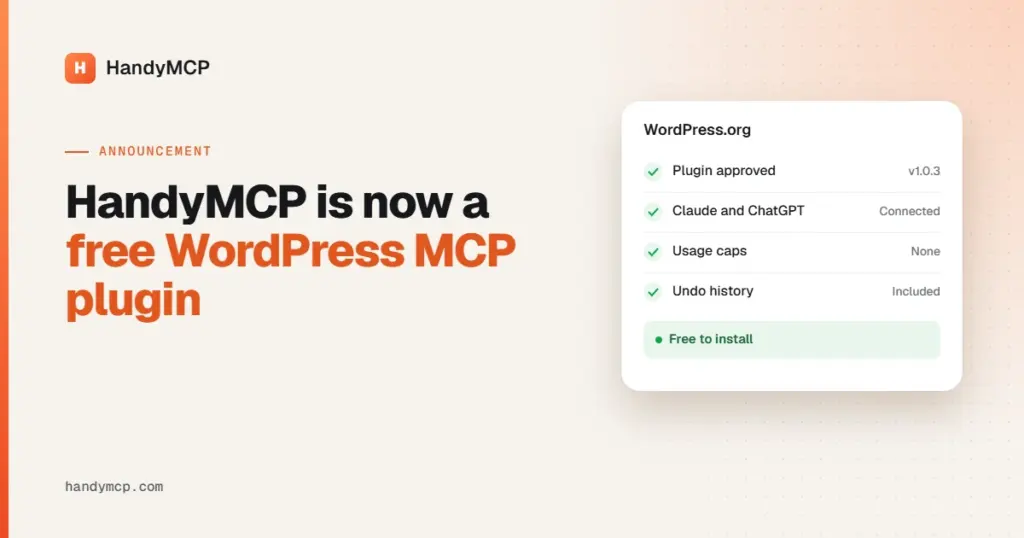
Looking for a free WordPress MCP plugin you can trust on a real site? HandyMCP is now live on WordPress.org. It turns your WordPress site into an MCP server, so Claude, ChatGPT, Cursor and other AI apps can write posts, build pages and update products for you, in plain words, with every change logged and easy to undo.
This post covers what the free plugin does, how to install it in a few minutes, what it will never let an AI do, and when HandyMCP Pro makes sense.
Quick answer: HandyMCP is a free WordPress MCP plugin on WordPress.org. Install it from Plugins > Add New by searching “HandyMCP”, open HandyMCP > Connection, copy the server URL and add it to Claude or ChatGPT as a custom connector. There is no account, no API key and no usage cap, and the last 20 changes can be undone in one click.
What is a WordPress MCP plugin?
MCP (Model Context Protocol) is the open standard AI apps use to talk to other software. A WordPress MCP plugin gives an AI app a safe, structured way to read and change your site: list pages, edit a heading, create a draft, update a price. Without one, you copy and paste between the chat and wp-admin all day. If you are new to the idea, start with what MCP means for WordPress owners.
HandyMCP runs the MCP server inside your own WordPress site. The AI app connects to your site directly. There is no relay service in the middle and no HandyMCP account, so your content never passes through our servers.
What the free HandyMCP plugin can do
- Posts and pages: list, read, search, create, edit, duplicate, schedule, trash and restore. Small text edits do not resend the whole page.
- Block editor (Gutenberg): insert, update and remove blocks, or build a whole page in one step.
- Elementor: build and edit pages with the widgets on your site, including addon packs such as ElementsKit, Happy Addons and Essential Addons.
- WooCommerce basics: titles, descriptions, prices, sale prices, stock and categories, plus read-only orders.
- Forms: create and edit Contact Form 7 and WPForms forms, and read entries from many other form plugins.
- Media and stock photos: upload images, write alt text and add free photos from Openverse, Pexels or Unsplash.
- SEO: set SEO titles, meta descriptions and focus keywords in Yoast SEO or Rank Math.
- Site brief: write your brand voice and house rules once, and every connected AI app follows them.
How to install the free WordPress MCP plugin
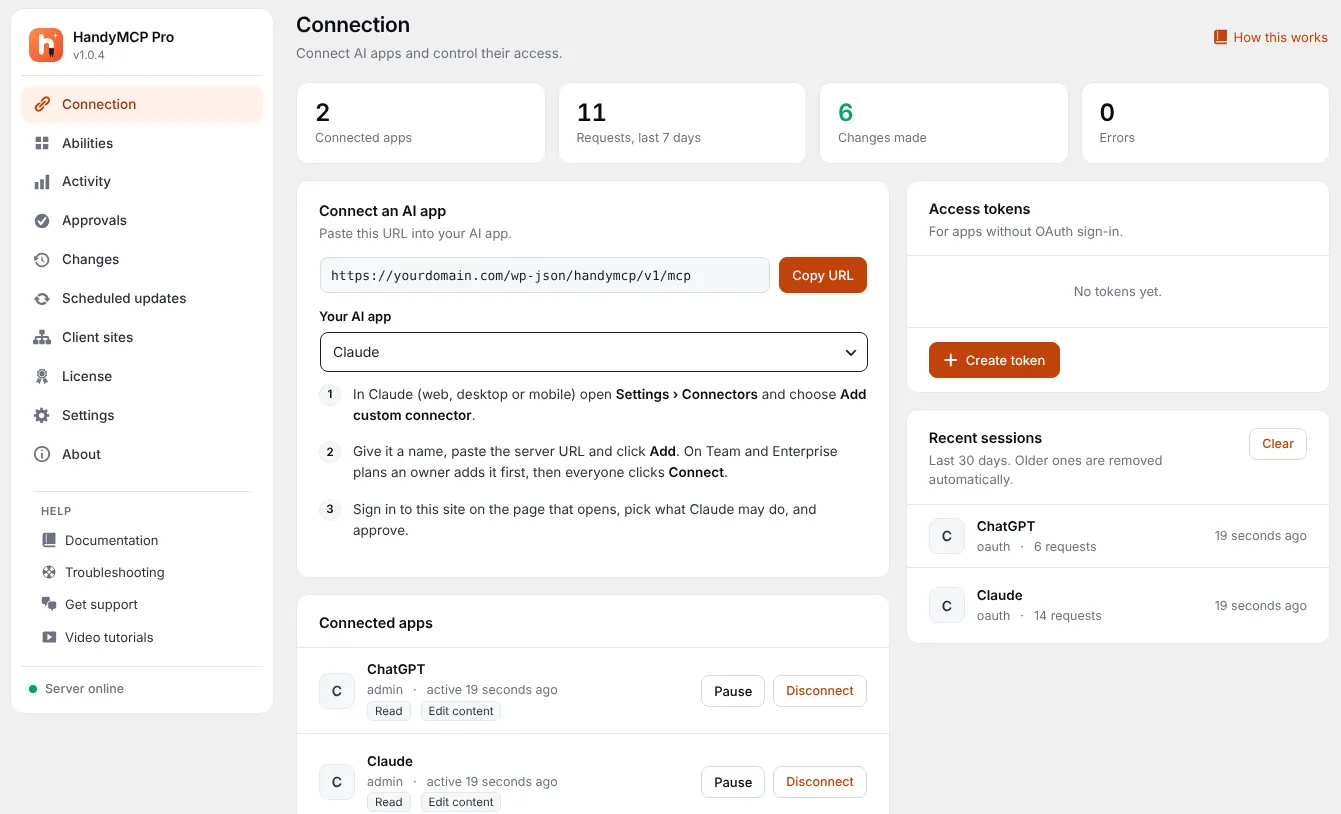
- In wp-admin, go to Plugins > Add New, search for HandyMCP, then click Install and Activate.
- Open HandyMCP > Connection and click Copy URL.
- Pick your AI app in the list on that screen and follow its steps. In Claude, open Settings > Connectors > Add custom connector and paste the URL.
- Sign in to your site on the page that opens, choose what the app may do and approve it.
- Ask for something small first, such as “list my five latest posts”.
Your site needs HTTPS for Claude and ChatGPT to connect. Step by step guides: connect Claude, connect ChatGPT, connect Cursor and connect Claude Code. If something blocks the connection, see 12 fixes for WordPress MCP not connecting.
Safety built into a free plugin
Giving an AI app access to a live site only works if you stay in control. These protections are in the free plugin, not behind a paywall:
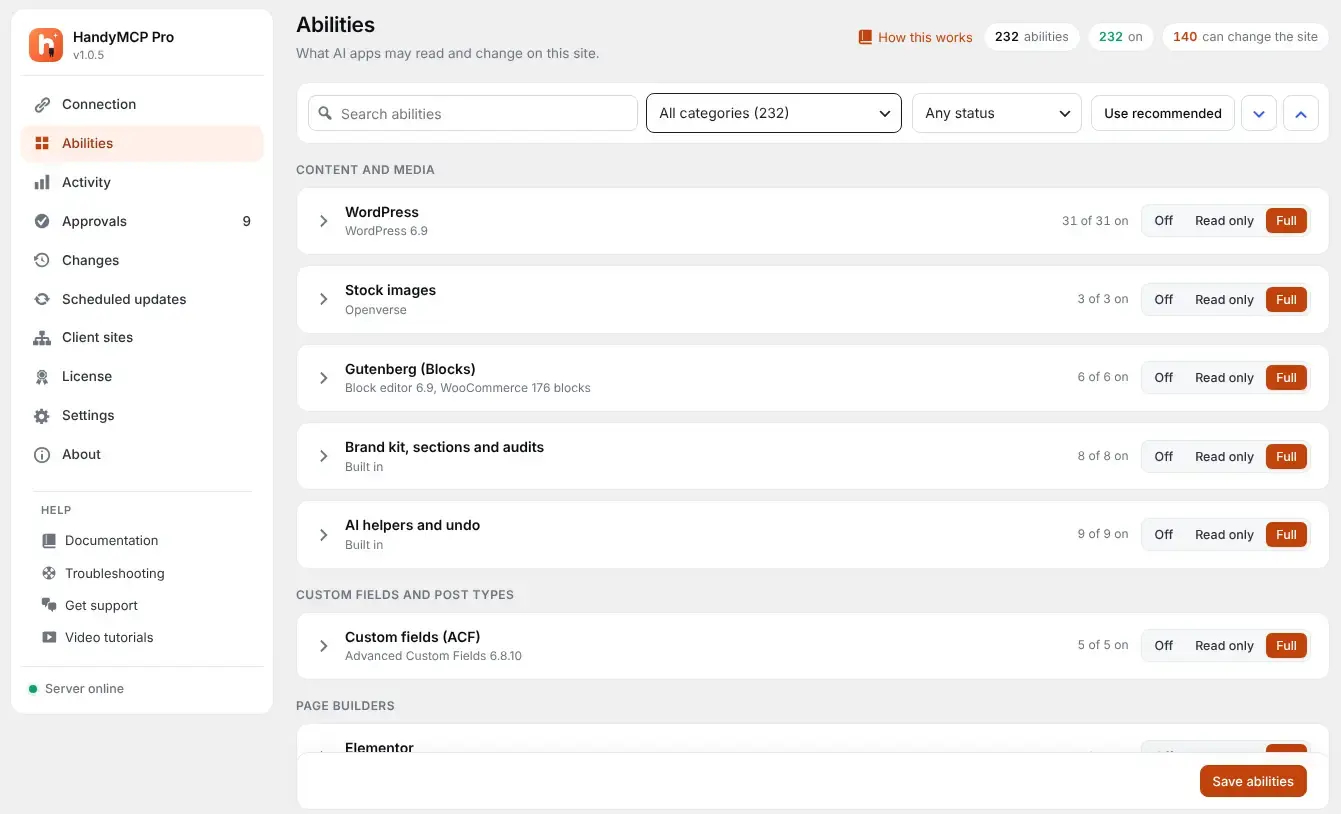
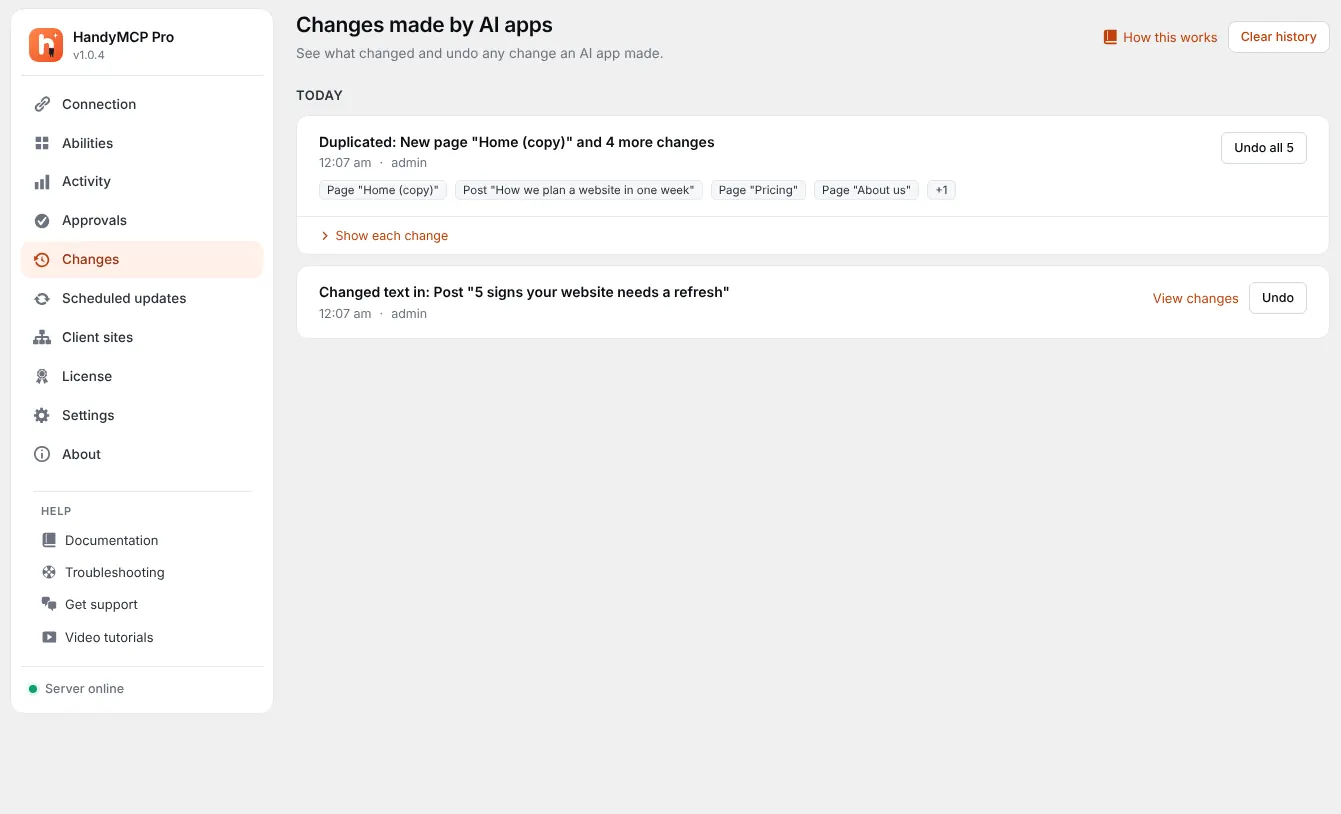
- One-click undo. Before a change, HandyMCP saves how things were. Undo a single change or a whole task from the Changes screen (called Undo history before version 1.0.4), or ask the AI to undo it.
- Everything logged. The Activity screen lists every request, the app that sent it and the page it touched.
- Permissions you choose. Turn groups of tools off, make them read only, or use read-only mode for the whole site.
- Live pages stay safe. “Make a new version” creates a draft. A published page is only replaced when you clearly ask.
- No site administration. AI apps cannot install plugins, manage users, edit files or run code through the free plugin, even when you connect as an administrator.
Want the full picture? Read is it safe to let AI edit a live WordPress site.
What is new in the free WordPress MCP plugin (version 1.0.4)
HandyMCP 1.0.4 came out in October 2026 for both the free plugin and Pro. The main changes:
- Changes screen. “Undo history” is now called Changes, with a View changes option that shows before and after for each edit.
- Image tools. Crop, resize, rotate or convert an image into a new copy, rebuild thumbnails, and replace an image while keeping its URL, with a backup.
- Uploads from a URL or a chat. Upload images from a URL or a picture shared in ChatGPT, with resize and WebP or JPEG conversion.
- Better crash reports. When a change breaks something, the report names the plugin or theme involved.
- Opt-in error reports. Anonymous error reports are off by default. You choose whether to turn them on.
- Cloudflare Access detection in the connection check, plus new activity_list and history_changes tools and clearer error messages.
The full list is on our changelog page.
Your first week with the free WordPress MCP plugin
A simple plan helps you learn what the AI does well before you trust it with bigger jobs.
- Day 1: read only. Set the tool groups to read only in HandyMCP > Abilities. Ask questions like “Which pages have no meta description?” or “List posts older than two years.”
- Day 2: write a site brief. Add your brand voice, words to avoid and rules such as “new pages start as drafts”.
- Day 3: small edits. Turn content groups back on. Ask for SEO titles, alt text and small text fixes. Check each one on the Changes screen.
- Day 4: drafts. Ask for a new landing page as a draft in Gutenberg or Elementor. Review it in the editor before you publish.
- Day 5: practice undo. Make a change you do not like, then undo it from the Changes screen. Knowing undo works makes everything else easier.
By the end of the week you will know which jobs to hand to the free WordPress MCP plugin and which to keep for yourself.
Who the free WordPress MCP plugin is for
Bloggers and site owners use it for the jobs that pile up: meta descriptions, alt text, internal links and refreshing old posts.
Freelancers use the free WordPress MCP plugin to draft Gutenberg and Elementor pages faster, then polish them by hand.
Small WooCommerce stores use it to write product descriptions, update prices and stock, and find products that are running low.
Agencies that need approval mode, other page builders or a client sites hub usually move to HandyMCP Pro.
Free WordPress MCP plugin vs HandyMCP Pro
| Feature | Free | Pro |
|---|---|---|
| Posts, pages, media, menus, SEO | Yes | Yes |
| Gutenberg and Elementor pages | Yes | Yes |
| WooCommerce | Products, prices, stock | Plus orders, refunds, coupons, variations, reports |
| Other builders | No | WPBakery, Divi, Beaver Builder, Avada, Flatsome UX Builder |
| Undo history | Last 20 changes | Full history |
| Approval mode and protected pages | No | Yes |
| Safe plugin and theme updates with rollback | No | Yes |
| Client sites hub for agencies | No | Yes |
| Usage caps | None | None |
Moving to Pro keeps your connected apps, settings and history, so nothing needs to connect again. Compare all plans on the pricing page.
How HandyMCP compares to other WordPress MCP plugins
Most free MCP plugins give an AI app a way in. Fewer give you the controls to trust it on a client site. HandyMCP focuses on the second part: undo, an activity log, permissions per tool group and a clear approval screen when an app connects. For a side by side view, see the best WordPress MCP plugins compared and HandyMCP vs AI Engine.
Five prompts to try first
- “List my pages that have no meta description, then write one for each.”
- “Build a landing page for my webinar as a draft, using my brand colors.”
- “Find images without alt text and describe them.”
- “Which products are low on stock?”
- “Undo the last change you made.”
More ideas in 28 Claude prompts that save hours on WordPress.
More prompts for the free WordPress MCP plugin
Once the five starter prompts feel easy, try these. Each one is a real job the free WordPress MCP plugin can do on its own.
SEO and content
- “Find posts with an SEO title over 60 characters and suggest shorter ones. Show me before you save.”
- “Add two internal links to related posts in each of my five newest posts.”
- “Rewrite the intro of my oldest post so it is up to date, and keep the rest as it is.”
Pages and layouts
- “Duplicate my About page as a draft and make the text shorter and friendlier.”
- “Build a draft FAQ page in Gutenberg with eight questions about shipping.”
- “In the Elementor page called Services, change the second button text to ‘Book a call’.”
Media
- “Resize the hero image on the Home page to 1600px wide and convert it to WebP as a new copy.”
- “Add a free stock photo of a coffee cup to my latest post, with alt text.”
WooCommerce
- “Put every product in the Summer category on a 15% sale.”
- “Write a short description for each product that has none.”
With the free WordPress MCP plugin, every one of these is logged and can be undone, so you can test a prompt and roll it back if the result is not right.
Is a free WordPress MCP plugin enough for you?
For many sites, yes. If your site runs on Gutenberg or Elementor and you mostly work on posts, pages, media, SEO and basic WooCommerce, the free WordPress MCP plugin covers the daily work. It has 80+ tools, no daily limits and no account to create.
A free WordPress MCP plugin stops being enough in a few clear cases:
- Your site uses another builder. Flatsome, WPBakery, Divi, Beaver Builder and Avada need Pro.
- Other people review your changes. Approval mode, where AI changes wait for a person to approve them, is a Pro feature.
- You need a longer history. The free WordPress MCP plugin keeps the last 20 changes. Pro keeps the full history.
- You want the AI to handle updates. Safe plugin and theme updates with rollback are in Pro.
Start with the free WordPress MCP version, use it for a few weeks, and you will know quickly whether you need more. Moving up keeps everything in place.
Why we made a free WordPress MCP plugin
Most site owners want to try AI on their own site before they pay for anything. A free WordPress MCP plugin with real safety features lets you do that on a live site, not a demo. You see how undo works, how the activity log reads and how drafts protect live pages. If HandyMCP fits how you work, Pro is there when you need it. If not, the free WordPress MCP plugin keeps working with no time limit.
Free WordPress MCP setup checklist
- HTTPS is working on your site.
- HandyMCP is installed and active from WordPress.org.
- The connection check on HandyMCP > Connection shows no problems.
- Your site brief has your voice, words to avoid and the rule “new pages start as drafts”.
- Abilities are set the way you want, with sensitive groups read only if you prefer.
- You have tried one undo from the Changes screen.
Tick these off and your free WordPress MCP setup is ready for daily work.
One more tip: keep a short note of the prompts that worked well for you. Reusing a prompt that already gave a good result is faster than writing a new one, and it gives you consistent output across pages and posts. Many people keep these notes right in the site brief so every AI app sees them. Review the list once a month and remove the prompts you no longer use.
Troubleshooting the free WordPress MCP setup
Claude or ChatGPT says it cannot reach my site
Open HandyMCP > Connection and run the connection check. It explains what is blocking the AI app, such as a firewall rule, a security plugin or Cloudflare Access, and how to fix it. Your site also needs HTTPS.
Sign-in fails on my host
Some hosts block the sign-in step. Since version 1.0.3 you can connect with an access token instead. Create one on the Connection screen and paste it into your AI app.
The AI says a tool is not allowed
Check HandyMCP > Abilities. The group may be off or read only. Turn it on, then start a new chat so the app reloads the tool list.
I want to remove an old connection
Use the one-click reset on the Connection screen to clear old app connections, then connect again.
Still stuck? The HandyMCP docs cover every setting. For background on the protocol itself, see modelcontextprotocol.io.
Frequently asked questions
Is HandyMCP really free?
Yes. The plugin on WordPress.org is free, with no usage caps, credits or per-call fees. You only need your own subscription to the AI app you use.
Do I need an API key or account?
No. There is no HandyMCP account and no API key. Optional Pexels and Unsplash keys only improve stock photo search.
Which AI apps work with this free WordPress MCP plugin?
Any app that supports remote MCP servers over HTTP, including Claude (web, desktop and Claude Code), ChatGPT, Cursor, VS Code with GitHub Copilot, Windsurf and Gemini CLI.
Does it work on SiteGround and behind Cloudflare?
Yes. See the guides for SiteGround and Cloudflare if a firewall blocks the sign-in.
Can the AI break my site?
The free plugin only works with content, never plugins, users, files or code. Every change is logged, and the last 20 can be undone in one click.
Does the free WordPress MCP plugin have daily limits?
No. There are no daily limits, credits or per-call fees. The plugin runs on your own site, so the only limits are the ones in your AI app plan.
Can I use the free WordPress MCP plugin with WooCommerce?
Yes. It edits product titles, descriptions, prices, sale prices, stock and categories, and reads orders. Refunds, coupons, variations and reports are in Pro.
Can I use it on client sites?
Yes. The free plugin has no site limit. For client work, many agencies add Pro for approval mode, full history and the client sites hub.
Where do I download it?
From wordpress.org/plugins/handymcp, or search “HandyMCP” under Plugins > Add New in your dashboard.
Ready to try it? Get HandyMCP free on WordPress.org, or start a 7-day Pro trial from the pricing page. If you like it, a short review on WordPress.org helps other site owners find it.